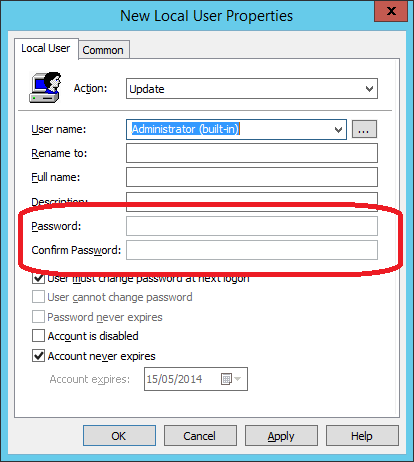
 A number of month ago I did a blog post explaining why the use of passwords (a.k.a. cPasswords) in Group Policy Preferences was such a bad idea ( see Why Passwords in Group Policy Preference are VERY BAD). Well Microsoft have now taken the additional steps and now release a new hot fix for Group Policy Management Console that explicitly blocks the functionality (MS14-025: Vulnerability in Group Policy Preferences could allow elevation of privilege). What this effectively means is that after you have installed this patch you can no longer add or modify the password field on any Group Policy Preferences. As you can see how this looks in the "User Group Policy Preferences" where the password dialog fields are now greyed out.
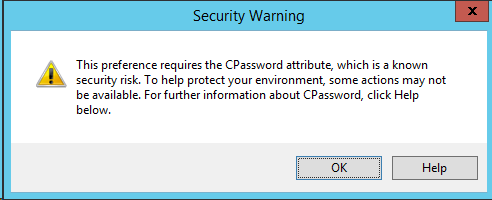
  But now you might be wondering what happens if you already have the password configured on a Group Policy and you try to edit that password... As you can see below, when you edit an existing Group Policy Preference settings with a password configured you will see the following dialogue box warning.
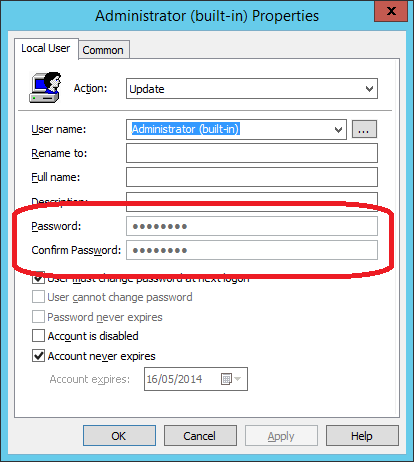
  You can see that the password is configured, however you will not be able to modify or delete the value using the user interface..
  So this means that after years of guidance / warnings from Microsoft to not use passwords in Group Policy Preferences they are now explicitly blocking the ability to configure this via the UI. However this patch is not automatically pushing out this patch therefore this removal of functionality will only happen when you explicitly install the update. This hotfix is available for ALL versions of Group Policy Management Console that support Group Policy Preferences and you you can get the files via Vulnerability in Group Policy Preferences Could Allow Elevation of Privilege (2962486) Coming soon: How to Manage Local Admin Password and How to remove cPasswrods from your AD
Group Policy Preferences Password Behaviour Change - MS14-025