In this second of what I am sure are many FAQ posts, I am going to show you how you can use Group Policy Preferences to map printers in your organisation to help you do away with mapping printers via logon scrips.
Firstly this is only a brief introduction to printer mappings. If you want a more advanced tutorial on using Printer Preference then I recommend you take a look at my other post How to use Group Policy Preferences to dynamically map printers with Roaming Profiles.
Firstly you will need to check that you have already have got the Group Policy Preference Prerequisites installed and you also have the Group policy Management Console Installed on a management computer in your environment.
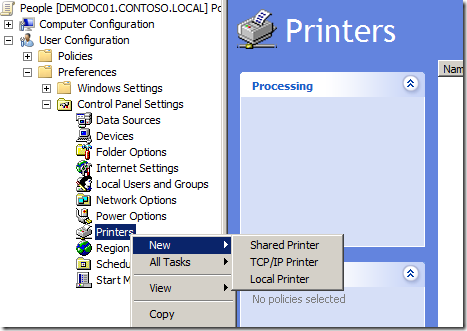
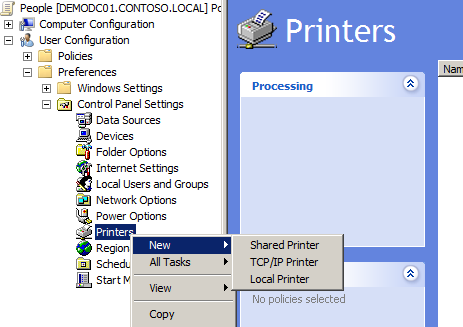
Now to map the printers all you need to do is go to the Printer Extension option of the Group Policy you want to apply the setting from (see below).
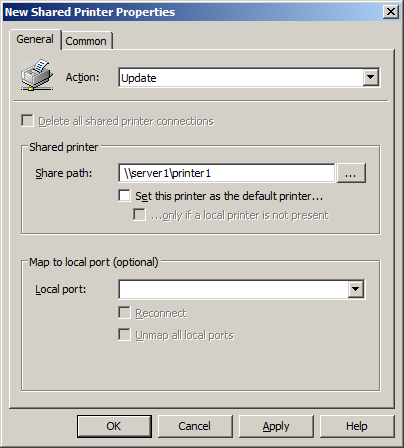
All you need to do now is put the UNC Path of the printer in the "Shared path:" text field and your done. No more batch files, vbscripts or KIX scripts to edit and maintain for mapping printers... NICE!!!
Also remember that you can also target this setting using Preference Item-Level Targeting using the traditional Security Group Targeting or you can be a little more dynamic and use IP Address Range Targeting or Site Targeting.